
New Feature: Improved Fixed Fee Invoicing

When billing for fixed fee projects we’ve added a couple of features to make invoicing more convenient and accurate.
First, when creating a new invoice and selecting a fixed fee project, Harpoon will check the project’s remaining fixed fee budget and display that amount for reference as you’re filling out the invoice:
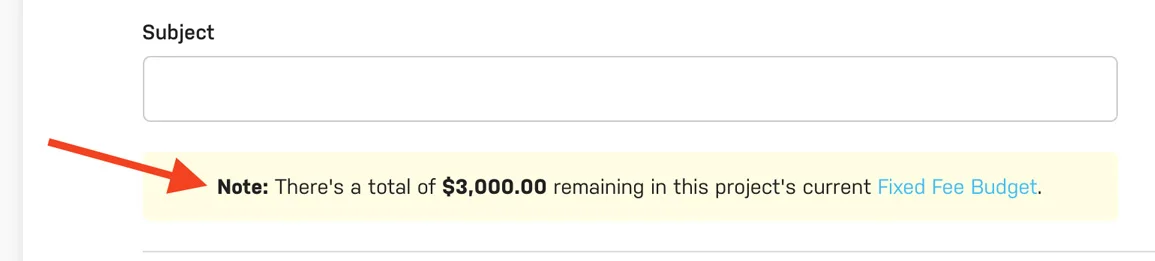
This helps ensure that you’re not over or under billing your client based on the fixed fee budget set for the project.
For example, you might have a project with a total fixed fee budget of $5,000. If you’ve already invoiced an amount of $2,000 earlier on in the project (perhaps for a deposit), the next invoice you create for the project will display a remaining fixed fee budget amount of $3,000 for reference. This comes in especially handy if you’re billing in incremental milestones for a project as Harpoon will keep track of previous invoice amounts and always display the current remaining fixed fee budget for each subsequent invoice you create.
Second, when creating a new invoice and selecting a fixed fee project, Harpoon will automatically hide the “Quantity” and “Unit Price” columns on the invoice so your client doesn’t see them, indicated by the “hidden” icons next to the column labels:
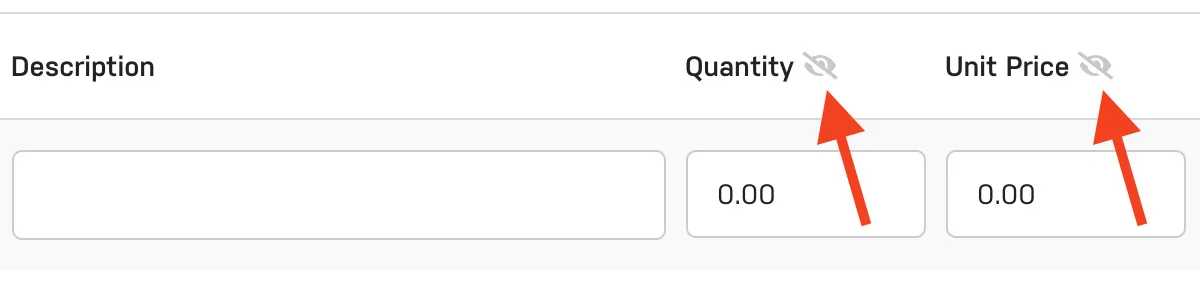
This is because the majority of fixed fee invoices use a fixed, flat fee and don’t require quantities and units. But you still have the freedom of showing those columns if you’d like by clicking the “Customize” button in the upper right of the invoice.
These are just a couple details to help smooth out the experience of billing for fixed fee projects. Have additional ideas? Let us know!