
We Rebuilt Harpoon
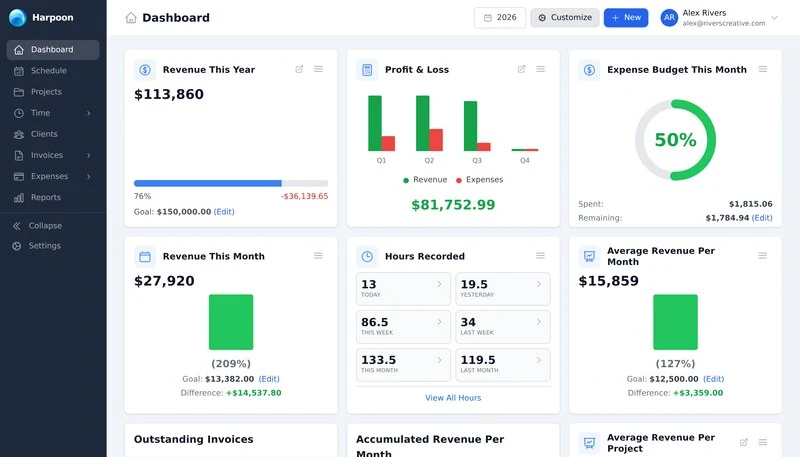
We've spent most of the past year working on a new version of Harpoon's interface.
The dashboard, invoices, time tracking and clients changed the most. Those are the screens you use every day, and they were the ones that had gotten slow. We rebuilt them to be quicker and easier to get around, then updated the rest of the app to match.
Here's what it looks like.

Getting Around
Dashboard, schedule, projects, time, clients, invoices, expenses and reports all sit in the sidebar now, in the same spot on every screen. Getting from an invoice back to its project takes one click instead of a trip back through a menu.
The Dashboard
The dashboard is built from widgets. You can reorder them or remove the ones you don't use, so you're left with the numbers you actually check.
Invoices and Time
Invoices open onto a chart of your monthly revenue, with filters for client, project, date and status sitting above the table.

Timers now stack in one list, each with its own client, project and task. Switching between two jobs in an afternoon takes a click.

It's Faster Too
The redesign gave us a chance to speed up Harpoon's busiest screens.

The difference is most noticeable on larger accounts, where years of clients, invoices and expenses have piled up.
Themes and Phones
There are four themes now: light, dark, snow and automatic. Automatic follows your computer's setting, so Harpoon goes dark in the evening along with everything else.

Snow is worth a look if you've never got on with dark mode. It's cooler and softer than the standard light theme without going all the way dark.
Harpoon is also built to work at phone width now, rather than shrunk down to fit it.

Harpoon Outside of Harpoon
In February we connected Harpoon to AI assistants like Claude, ChatGPT, Cursor and VS Code. That launched with 24 tools. It now has 69.
You can start and stop timers, create an invoice, record a payment against one, or turn an accepted estimate into an invoice. Reporting came along too: profit and loss, tax summaries, accounts aging and timesheets. All of it stays scoped to your team and your role's permissions.
What's Next
This is the foundation for where Harpoon goes next.
There are still parts of the application we're bringing across to the new interface, and we have a long list of things we want to do with reporting, automation and the AI integration. But the screens you work in every day are already faster, cleaner and much easier to get around.
If you'd like to try it, you can switch to the new interface from your account. It isn't the default yet, but it will be soon, and there's a "Switch back to classic" link in the account menu whenever you want it.
We hope you like it.