
How do I track other non-invoice income in my account?
Not sure which one you're using? The new interface has a dark sidebar and /app/ in the web address; the classic interface has a bright blue sidebar. You can switch at any time: in the new interface, click your name (top right) and choose Switch back to classic; in the classic interface, hover your avatar (bottom left) and choose Try the new Harpoon.
Although Harpoon focuses on service-based businesses that primarily invoice clients as their main source of income, there are times when you might receive income from other sources.
For example, besides client work, maybe your agency also sells WordPress themes and plugins on your own online store. Or maybe you sell eBook downloads, or your own merch. These are all sources of income that count as revenue for your business, but are outside of the typical invoicing flow you use to bill clients.
Adding Other Income
To record this non-invoice income, go to the Other Income screen. You’ll find it within the Invoices section: hover over Invoices in the left sidebar and choose Other Income, or click the Other Income tab at the top of your Invoices screen.
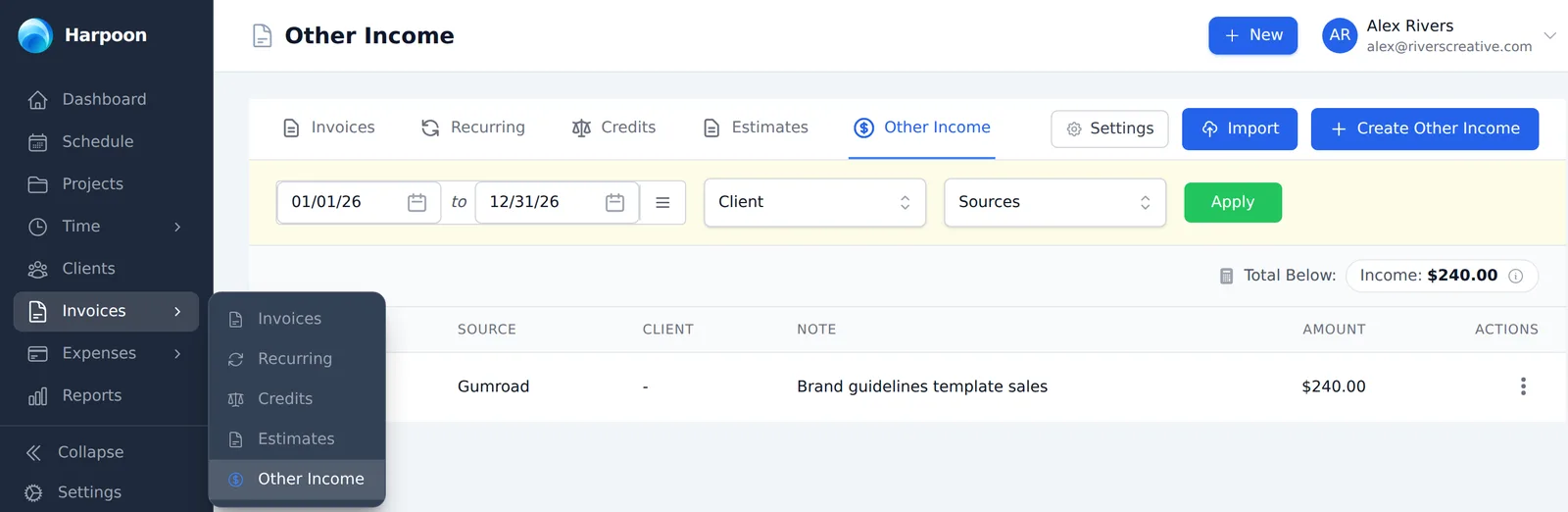
Click the Create Other Income button at the top of the screen to record a new entry. You’ll be presented with the following fields:
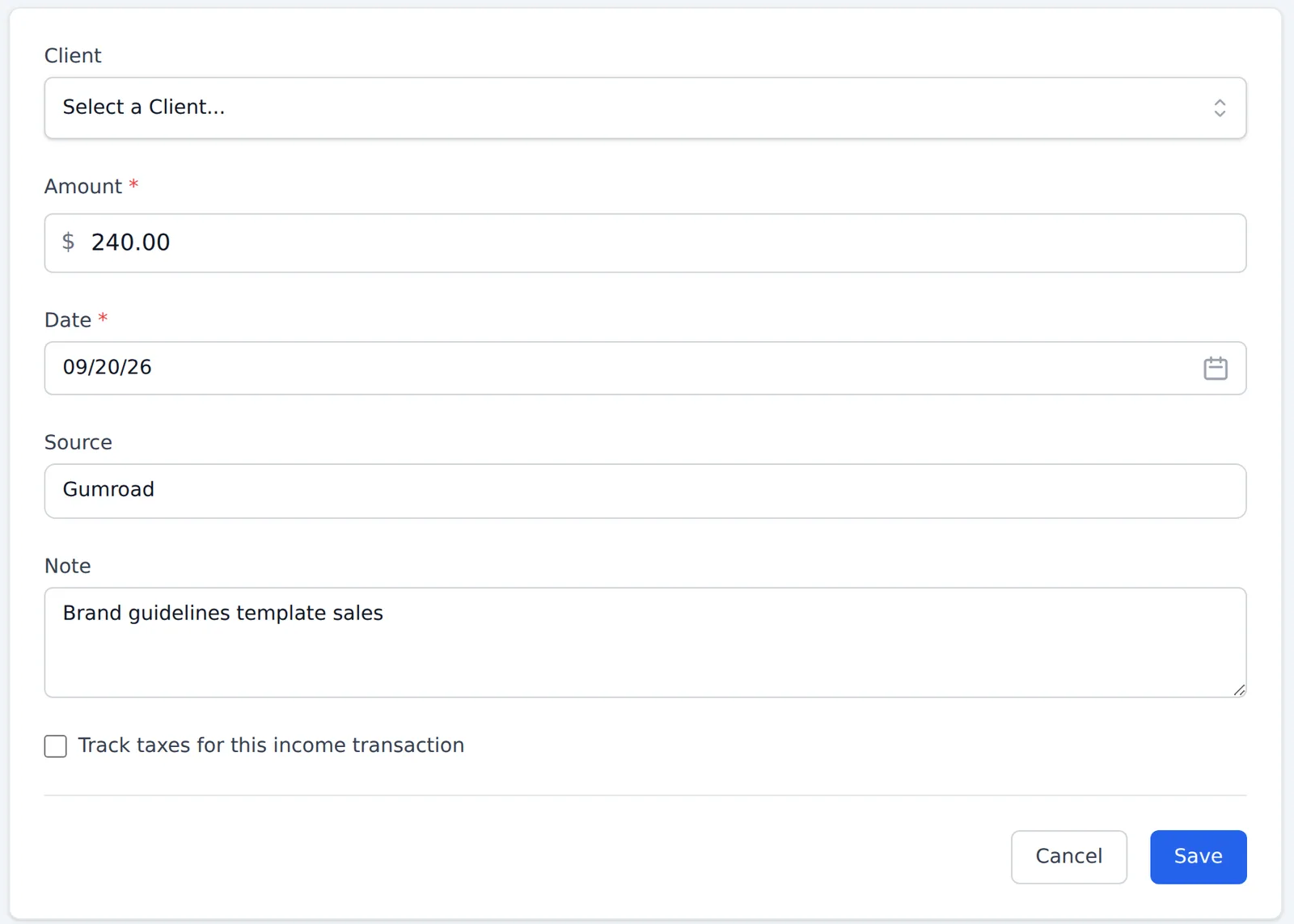
- Client: If this income is associated with one of your clients you can select them here. Otherwise leave it blank.
- Amount: The total amount of income (including taxes) received with this entry.
- Date: When did your business receive this income?
- Source: This helps you keep track of where the income came from (e.g. your online store, a royalty, a speaking fee).
- Note: Any additional details you’d like to record about this income.
- Track taxes for this income transaction: If you need to track the taxes you’ve collected as part of this income, check this box to apply any of your account’s tax rates to the entry. (This option only appears once you’ve set up taxes in Tax Settings.)
Click Save and you’ll see your new entry listed on the Other Income screen, where you can filter entries by date range, client and source.
CSV Import
Besides recording one entry at a time, you can also import a CSV file of multiple entries with the Import button at the top of the Other Income screen. Select your file, then match its columns to Harpoon’s Date and Amount fields (plus the optional Source and Note fields).
This is a great option if you’d like to import a bunch of income history into your account, or if you have a lot of other income transactions to record each month.
Tracking Other Income
Any Other Income entries you add to Harpoon will affect your account in the following ways:
- Your Other Income entries are included in your business-level (and client-level, if a client is selected) revenue calculations, based on the entry date. This includes places like your Dashboard and your Profit & Loss report.
- Your Schedule shows an Other Income row that tracks the other income you’ve recorded each month, combined with the revenue from your invoice payments, so your goal tracking stays accurate.
- Each client’s details screen has an Other Income tab listing the Other Income entries for that client.
- The Tax Summary report includes any taxes tracked on your Other Income entries.
In other words, all you need to do is record your other income, and Harpoon makes sure it’s counted in all the right places in your account.
Other Income Report
Harpoon also provides an Other Income report (Reports → Other Income). This report focuses strictly on revenue recorded via your Other Income entries. It does not include revenue from your invoice payments. For invoice payments, use the Invoice Payments report.
Although Harpoon focuses on service-based businesses that primarily invoice clients as their main source of income, there are times when you might receive income from other sources.
For example, besides client work, maybe your agency also sells WordPress themes and plugins on your own Shopify site. Or maybe you sell eBook downloads using a service like Gumroad. Or perhaps your agency sells its own merch on a site like Etsy.
These are all sources of income that count as revenue for your business, but are outside of the typical invoicing flow you use to bill clients.
Adding Other Income
To record this non-invoice income just jump over to the Other Income screen in your Harpoon account. You'll find it within the Invoices section of Harpoon:
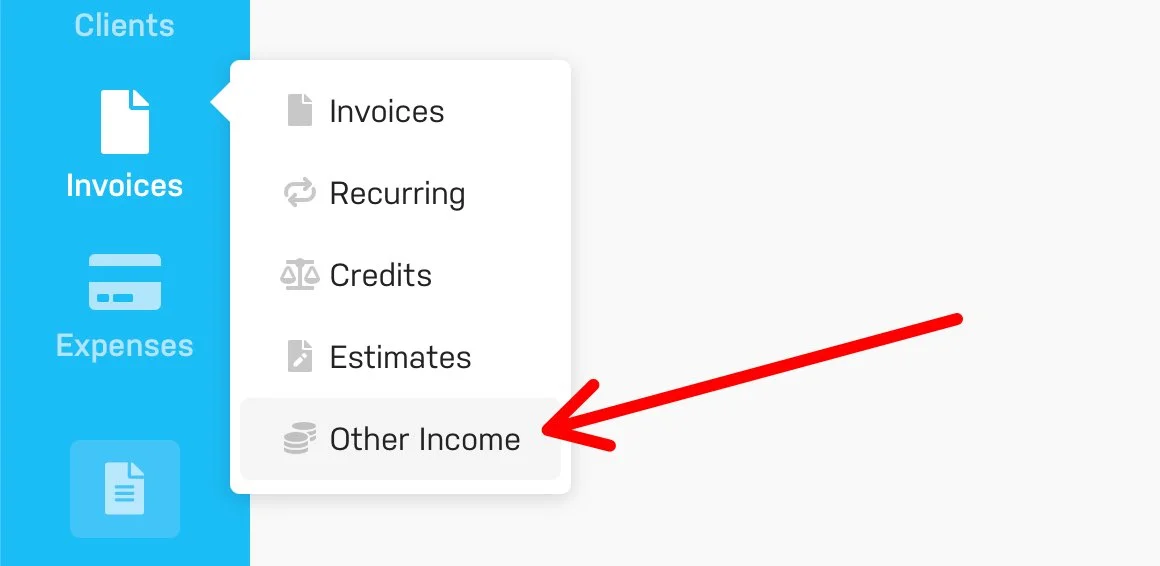
Once there you can click the "Create Other Income" button at the top of the screen to record a new entry. You'll be presented with the following fields:
- Date: When did your business receive this income?
- Source: This helps you keep track of where the income came from (e.g. Shopify, Gumroad, Etsy, etc.). Harpoon will keep track of your sources and auto-suggest them when recording future entries.
- Amount: This should reflect the total amount of income (including taxes) received with this entry.
- Client: If this income is associated with one of your clients you can select them here.
- Note: Any additional details you'd like to record about this income can be captured here.
- Track Taxes: If you need to track the taxes you've collected as part of this income, selecting this option allows you to apply any of your account's tax rates to this entry.
Just save the form and you'll see your new Other Income entry recorded on the page. Simple!
CSV Import
Besides manually recording one Other Income entry at a time, you can also choose to import a CSV file of multiple entries via the "Import" button at the top of the Other Income screen.
This is a great option for new users who might want to import a bunch of income history into their Harpoon account. Or maybe you just have a lot of Other Income sources and transactions to track each month and prefer a CSV file import as a timesaving shortcut.
Note: If you're looking for a more custom option, Other Income entries are also available via Harpoon's Public API for both importing and exporting.
Tracking Other Income
Any Other Income entries you add to Harpoon will affect your account in the following ways:
- Your recorded Other Income entries will be included in all business-level (and client-level if applicable) revenue calculations throughout your account based on the entry date of the income. This includes places like your Dashboard and your Profit & Loss Report.
- Your Schedule will display an "Other Income" row that tracks all the monthly Other Income you've recorded throughout the year and combines that with the revenue from the invoice payments already being tracked on your Schedule, so your goal-tracking will remain accurate.
- Your Client Details screens include an "Other Income" tab to help you track all Other Income entries associated with each client.
- The Tax Summary Report will include any taxes associated with your Other Income entries along with any taxes already being tracked from your invoices.
In other words all you need to be concerned about is recording your other income, and Harpoon will make sure this income gets processed and calculated in all the correct places in your account.
Other Income Report
Harpoon also provides an Other Income Report. This report focuses strictly on revenue recorded via your Other Income entries. It does not include any revenue received via your invoice payments. For invoice payments you can reference the existing Invoice Payments Report (which was renamed from the previous Payments Report).