
Built for hourly and project work: rate times hours, a fixed-fee line, net 30 terms. Download it or fill it in here.
Free. No signup. No watermark.
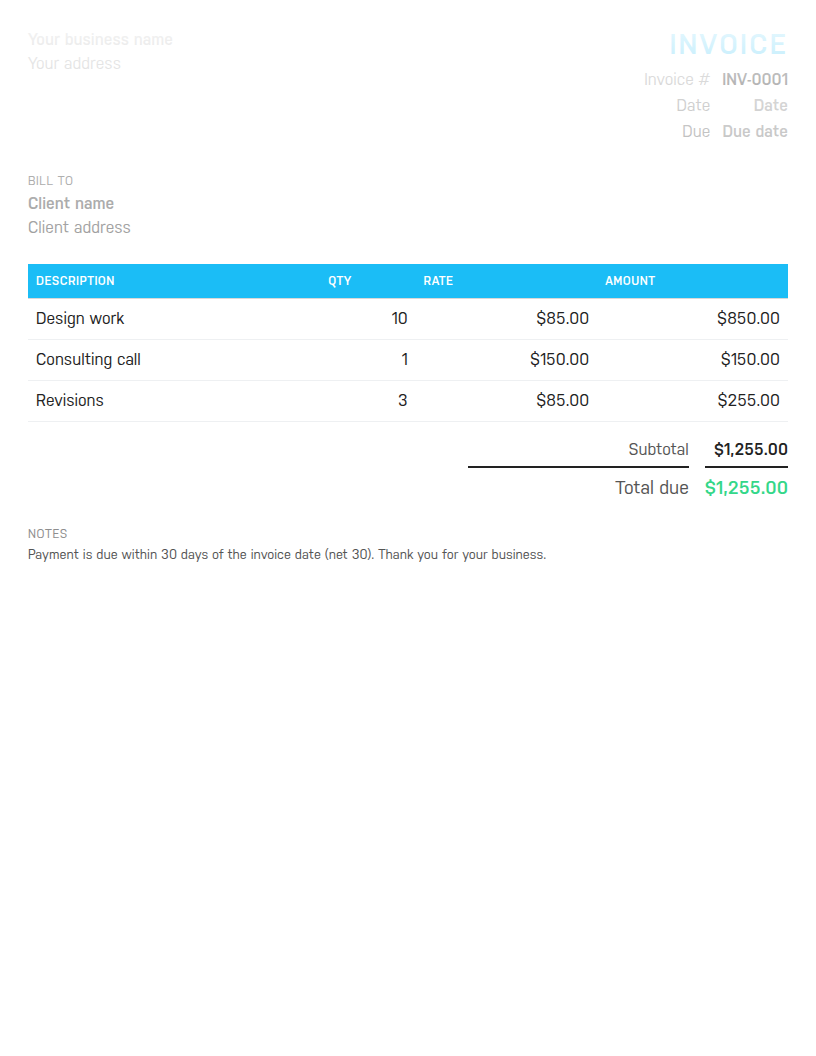
Word to edit and reuse, Excel with formulas that total the invoice for you, or PDF to send as is. Sample lines show an hourly task, a fixed fee and revisions.
Free. No email address required. The files contain no macros.

It will not track the hours, warn you when a client is slow to pay, or tell you whether this month keeps you on target for the year. Harpoon does all three, and it was built for freelancers. Try it free for 14 days.
A shop invoice lists products. A freelance invoice has to explain time and judgement, to a client who was not watching you work. That changes what goes on it. Each line should name the task and the deliverable, not just design or consulting. Hourly lines need the hours and the rate shown separately so the client can check the arithmetic against what was agreed. Fixed-fee lines need the scope in the description so nobody argues later about what was included. And the terms need to be on the invoice itself, because a freelancer rarely has an accounts department to chase for them.
This template is set up that way. The sample lines are an hourly task (design work, 10 hours at 85), a fixed-fee item (a consulting call at 150) and a revisions line billed by the hour. The notes carry net 30 terms. Change all of it to match your work.
Hourly work goes on the invoice as hours in the quantity column and your rate in the rate column, one line per task or per week. Round the hours the way you agreed with the client, typically to the nearest 6 or 15 minutes, and round before you total. If you are working from a timesheet, the timesheet calculator does the week's arithmetic for you.
Fixed-fee work is a quantity of 1 with the fee as the rate. Put the scope in the description: Logo design, three concepts, two rounds of revisions. Retainers are a fixed-fee line with the month in the description, sent on the same date every month. Mixing hourly and fixed lines on one invoice is fine, and common; the template's sample rows do exactly that.
Say you spent 10 hours on design work at 85 an hour, held a consulting call for a flat 150, and did 3 hours of revisions at the same 85 rate. The lines come to 850, 150 and 255, for a subtotal of 1,255. The client is a repeat customer with a 5 percent loyalty discount, which takes off 62.75 and leaves 1,192.25. If you charge 8.25 percent sales tax, the tax line is 98.36 and the total due is 1,290.61. The Excel file and the online builder work all of that out as you type.
For a general-purpose layout with different sample lines, use the invoice template. For empty rows to print and write on, the blank invoice template. To make one invoice in your browser right now, the free invoice generator. Before you set a rate, the yearly revenue goal calculator shows what your hours need to earn, and our post on raising your freelance rates covers how to move it up. Harpoon's invoicing and time tracking put the hours on the invoice for you once you are ready.
Hours Calculator · Time Card Calculator · Time Clock Calculator · Timesheet Calculator · Yearly Revenue Goal Calculator · Invoice Generator · Invoice Template · All free tools