
Concepts, revisions, deliverables and usage rights, laid out the way design clients expect. Download it or fill it in here.
Free. No signup. No watermark.
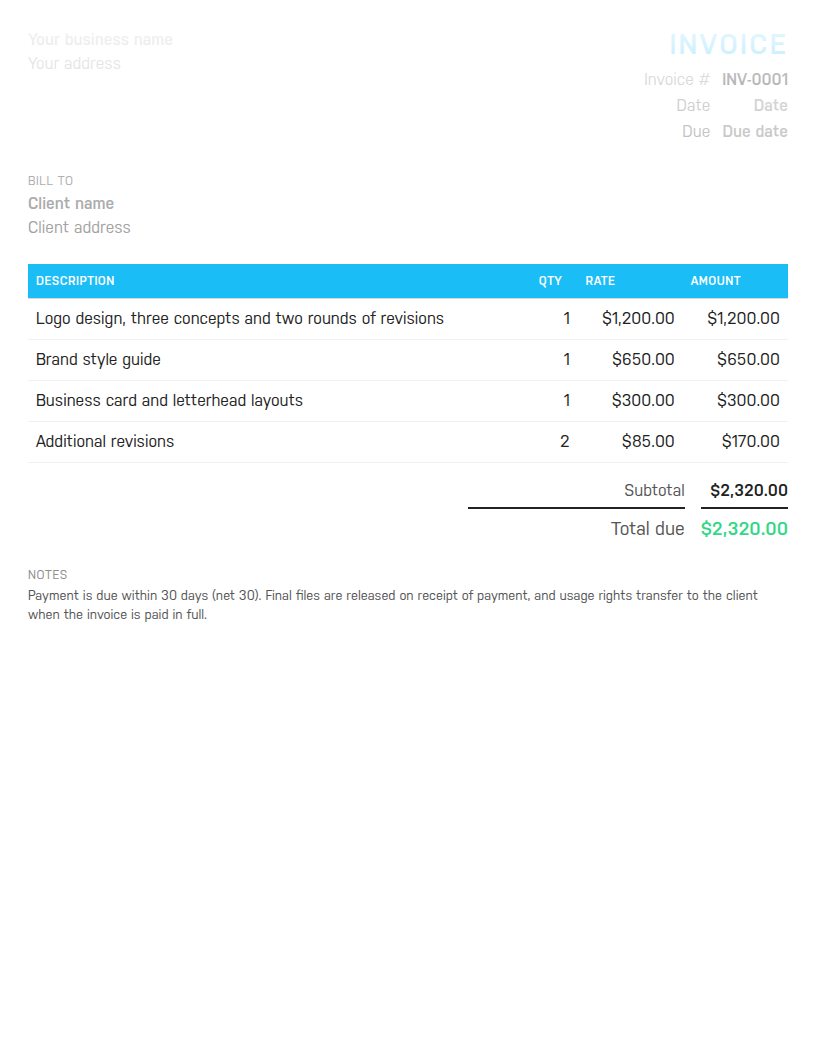
Word to edit and reuse, Excel with formulas that total the invoice for you, or PDF to send as is. Sample lines cover a brand project: logo, style guide, stationery and paid revisions.
Free. No email address required. The files contain no macros.

The template cannot track the hours behind a fixed fee, chase the client who is 20 days late, or tell you whether this quarter pays the rent. Harpoon does all three. Try it free for 14 days.
Design work is sold as outcomes, but clients remember it as rounds. A good design invoice names both: the deliverable and what was included to get there. Logo design, three concepts and two rounds of revisions tells the client exactly what they bought and why a third round costs extra. It also needs to say what happens to the files and the rights, because the moment the invoice lands is the moment clients ask for the source files.
This template is set up that way. The sample lines are a logo with concepts and revisions included, a brand style guide, business card and letterhead layouts, and two hours of additional revisions billed hourly. The notes say final files are released on receipt of payment and that usage rights transfer when the invoice is paid in full. Change all of it to match your project.
Most design projects are quoted as a fixed fee with a set number of revision rounds. Put the fixed fee on one line with a quantity of 1 and the rounds in the description. Anything beyond the agreed rounds goes on an hourly line: hours in the quantity column, your rate in the rate column. That way the client sees the scope they agreed to and the overage they asked for, on the same invoice, without a debate.
Retainers work the same way: one fixed-fee line with the month in the description, sent on the same date each month. Mixing fixed and hourly lines on one invoice is normal and this template's sample rows do exactly that.
Say you designed a logo for 1,200, wrote a brand style guide for 650, laid out business cards and letterhead for 300, and did two extra hours of revisions at 85. The lines come to 2,320. You offered a returning client 5 percent off, which takes 116 off and leaves 2,204. With 8.25 percent sales tax the tax line is 181.83 and the total due is 2,385.83. The Excel file and the online builder work all of that out as you type.
Use one invoice sequence for the whole studio, INV-0001 then INV-0002, never reused, even when a project runs to several milestone invoices. Date each invoice the day it goes out and set the due date to match the terms you agreed, which for design work is usually net 30 or a deposit up front and the balance on delivery. Restate the terms in one line in the notes. If you are registered for sales tax or VAT, put the registration number there too and show the tax as its own line rather than folding it into the fees.
For general hourly and project work, use the freelance invoice template. Photographers have the photography invoice template, and web projects the web design invoice template. To make one invoice right now without downloading anything, use the free invoice generator. Harpoon's invoicing and time tracking put the hours behind a fixed fee on the record once you are ready.
Hours Calculator · Time Card Calculator · Time Clock Calculator · Timesheet Calculator · Yearly Revenue Goal Calculator · Invoice Generator · Invoice Template · All free tools
