
Design, build, content and launch on one invoice, or one milestone at a time. Download it or fill it in here.
Free. No signup. No watermark.
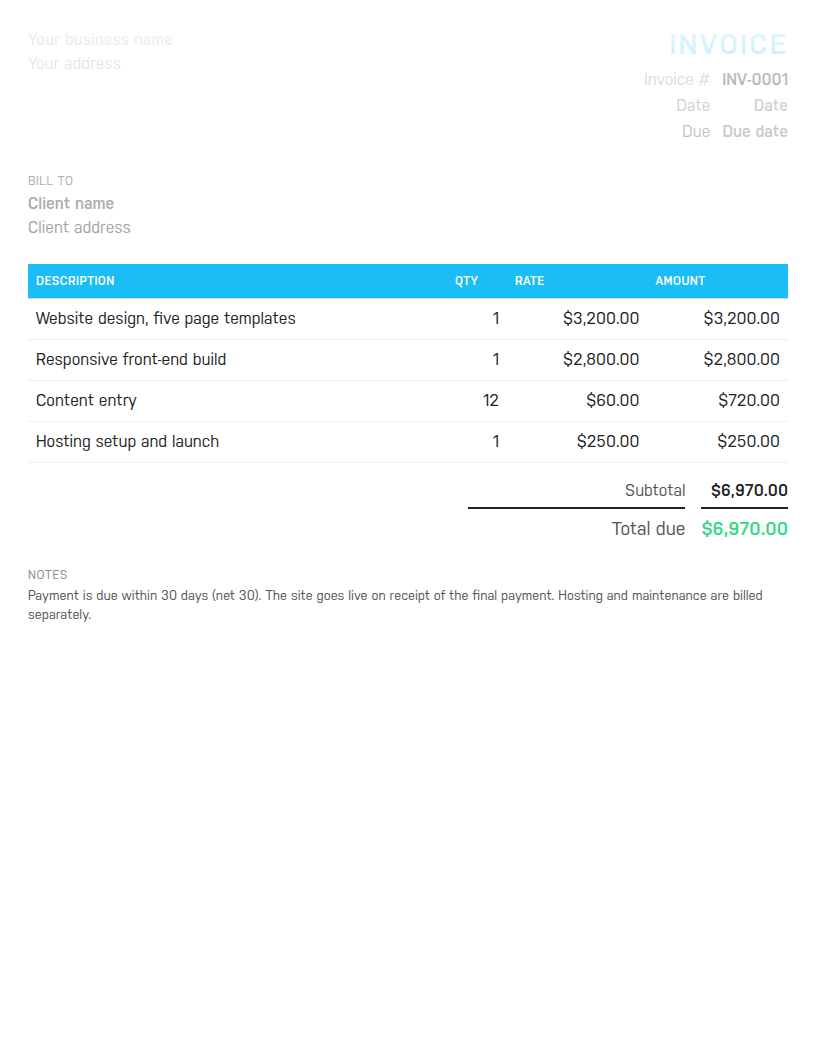
Word to edit and reuse, Excel with formulas that total the invoice for you, or PDF to send as is. Sample lines cover a site build: design, front-end build, content entry and launch.
Free. No email address required. The files contain no macros.

The template cannot split a project into milestone invoices for you, track the hours against the fixed fee, or forecast the year from what is booked. Harpoon does. Try it free for 14 days.
A website is delivered in stages and paid for in stages, and the invoice should make that easy to follow. Each stage is a line: the design, the build, the content going in, the launch. Each line says what it covered, so Website design, five page templates rather than design. Anything billed per unit, such as content entry or extra pages, carries a quantity so the client can check the arithmetic. And the notes say when the site goes live and what is not included, because hosting and maintenance are the questions that arrive the week after launch.
This template is set up that way. The sample lines are the design of five page templates, the responsive front-end build, content entry for twelve pages billed per page, and hosting setup with launch. The notes say the site goes live on receipt of the final payment and that hosting and maintenance are billed separately. Change all of it to match your project.
Few clients pay for a whole site in one go, and few designers should build one without money in. The usual pattern is a deposit at signing, a payment when the design is approved, and the balance at launch. Use the same template for each milestone invoice: put the full project on the lines so the client sees the whole scope, then add a line such as Deposit received at signing with a quantity of 1 and the deposit as a negative rate, so the total shows only what is due now. Number the invoices in sequence and refer back in the notes.
Say you designed five page templates for 3,200, built the responsive front end for 2,800, entered content for twelve pages at 60 a page, and set up hosting and launched the site for 250. The lines come to 6,970, which is what the sample invoice shows. If you took a 30 percent deposit at signing, a line for -2,091 brings the balance due to 4,879. With no sales tax on the service in your area, that is the total. The Excel file and the online builder work all of it out as you type.
Number every invoice in one sequence, INV-0001 then INV-0002, so a three-milestone project produces three consecutive numbers the client and your accountant can follow. Date each one the day it goes out and set the due date from the terms in your contract: due on receipt for the deposit, net 15 or net 30 for the later milestones. Restate the terms in one line in the notes, and if you are registered for sales tax or VAT put the registration number there and show the tax as its own line.
For general hourly and project work, use the freelance invoice template. Brand and print work fits the graphic designer invoice template, and photographers have the photography invoice template. To make one invoice right now without downloading anything, use the free invoice generator. Harpoon's invoicing handles recurring hosting invoices and milestone billing once you are ready.
Hours Calculator · Time Card Calculator · Time Clock Calculator · Timesheet Calculator · Yearly Revenue Goal Calculator · Invoice Generator · Invoice Template · All free tools